Adjusting maimai DX Offsets
tl;dr: skip everything until the “procedure” below
Several notes beforehand:
- Despite me believing that the logic is the same, this article might be not as helpful for those who plays only on touch.
- I play with zero in-game feedback sfx (i.e. the sound effects you hear from the game software when you hit a note,) and rely on the physical sound coming from the buttons when I hit them. The article should work for either way of play (i.e. sound from the physical buttons vs. tap sfx from the software) as long as you are determined on which one you anchor to for your playstyle.
concepts
music/song (楽曲): the soundtrack that you listen to when you play.
chart/visual (譜面): the arrangement of notes you look at when you play.
judgment (判定): the types of response (i.e. Perfect, Great, Good, Miss) you receive after you hit a note.
judgment timing A: the A offset you can change in your options, abbreviated as “offset A” or “A” in the article.
judgment timing B: the B offset you can change in your options, abbreviated as “offset B” or “B” in the article.
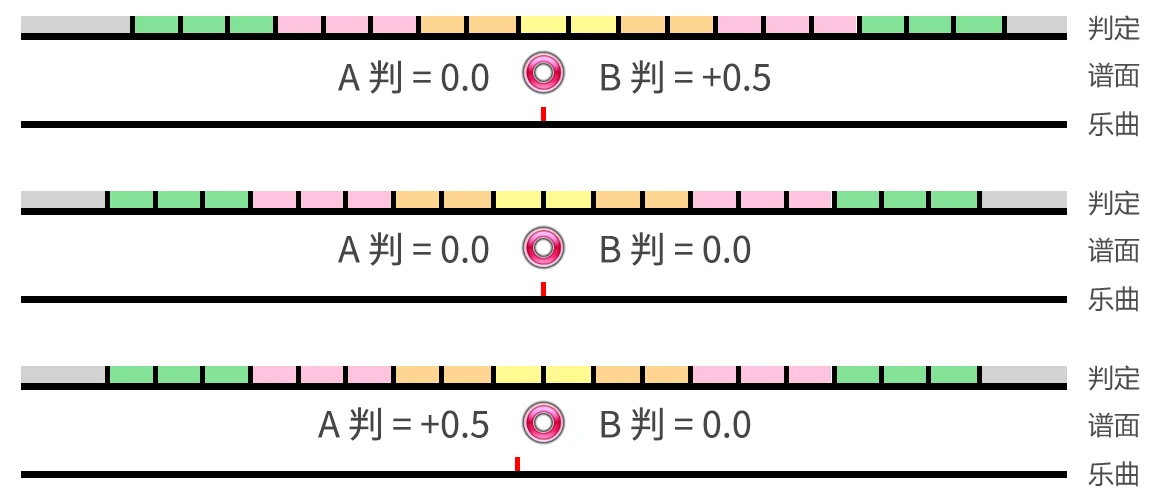
details on offset A & B; as well as an image showing concepts' relationships
What offset A actually changes is the offset on when the software plays the song in respect to the chart, i.e. whether to play the music ever so slightly earlier/later while the chart still happens at the same point of time.
What offset B actually changes is the offset on the judgment in respect to the chart. For example, you tapped +0.5 frames later compared to the preset judgment of this chart, by changing offset B, you tell the software to move the preset judgment later by 0.5 frames. Now you still tap at the same time, but the game records this tap as “exactly the perfect time” because the judgment now treats every response with a -0.5 offset.
procedure
I. adjusting offset B
- pick a song that you can comfortably achieve SSS or even SSS+ on, preferably expert or above and not very slow nor fast in bpm (because the sparser the chart is, the more inclined one times their tap based on visual signals, not the rhythm.)
- Start with offset A at 0.0, B at 0.0
- Switch the “display of judgment” to 3-D or any type that discerns and displays early & late perfects from critical perfects.
- Switch the “position of judgment tap” from “In - - - - o Out” all the way left until it says “Off”.
- Play the song with yourself relying on the rhythm of the music as much as possible, on the chart (visual) as little as possible. Do not adjust your timings because of what you see (even if you think the chart is going too early/late;) keep your timings in sync with the rhythm (i.e. tap to the beat).
- On the result screen, to the right of the top screen will show the number of fasts and lates. If there are significantly more fasts than lates (e.g., fast counts > 2 * late counts), adjust B to the negative side in steps such as from 0.0 to -0.3. If more lates than fasts, adjust B to the positive side similarly.
- (optional but recommended) Repeat these steps with the same song and adjust in smaller steps until neither of the fast/late counts is significantly more than the counterpart.
- (optional but recommended) You can assure that you have your optimal B offset by trying some other songs within your range and seeing a relatively balanced fast/late ratio for the majority of them, adjust further in small steps as you see fit. This step mainly rules out the unfortunate fact that a handful of songs in maimai have bad preset offsets to begin with (e.g., Mare Maris.)
II. adjusting offset A
In this section, we align the visuals to our likings so that it looks like the notes are flying right at the places where we feel like hitting them. Before this section it can feel like “I am hitting now because I am sticking to the rhythm, but things will change a lot if I play this song muted (i.e., using only the visual cues).” The optimal result after this section is something like “I will hit now based on the rhythm, and I will also hit now based on the visual.”
If you think that we are currently hitting the notes before they visually reach the curve (or any location you think the notes should be when you are hitting them). Add 0.3 to offset A and subtract 0.3 from offset B. If you add X to A, subtract X from B; they are coupled together in the opposite direction within the scope of this section.
Similarly, if you think the notes are already flying out of bounds when we are hitting to the beats, we should subtract X from A and add X to B.
why coupled
There is not a direct knob for the visuals in maimai. In order to shift the visuals, we have to shift both the music and the judgment together in the opposite direction to the visuals.
If we want to fast-forward the visuals (i.e. we are currently hitting the notes before they visually reach the curve), we need to move both the song and the judgment earlier compared to the chart/visuals. When we hear the song earlier while we don’t move the chart’s point-in-time, we perceive that the chart is coming at us later, thus fast-forwarded. However, now that the song is being played sooner, we will be hitting sooner as well, therefore we need to adjust the judgment together with the song if we only want to perceive a difference in visuals.
Make smaller coupled adjustments in subsequent plays with different songs well within skill range as you see fit.
III. reverting settings
change everything back to your likings except your offset A & B.
extra reads
- there is no right or wrong offset, each person defines the time to hit with the beat differently.
- we tend to hit fast (tries to catch everything) when we face a more difficult chart, this is why we want to adjust our offsets when we are in our comfort zone.
- because of the above, it is likely to see an unbalanced ratio of fast/late such as 120/40 when trying harder songs. You can either a. relax your offset to rebalance it to ~80/80 if you prioritize scores right now (i.e. trade dx score for score%) or b. try not to rush it - you will eventually raise your skills to a point where the song lands in your comfort zone such that you no longer rush it.
- there are songs in maimai that have wrong base offsets. You can take personal notes on them (e.g., “B+0.2 for song X”) and adjust per song.
ref:
Garry for sending the video below that inspired me dig into this offset problem for good.
Sign的中文小圈 - 抓不到判定?快速帶你理解maimai判定,手把手帶著調整,下一個準度玩家就是你!【maimai判定調整教學#1】